


SonicNest — Music Player
4.3146.00 Reviews
App Specs
- Version
- 1.5.8
- Updated On
- License
- Free
- Downloads
- 10,000,000+
- Developer
- YIXIANG
- Categories
- Music & Audio
- Platform
- Android, iOS
Screenshots
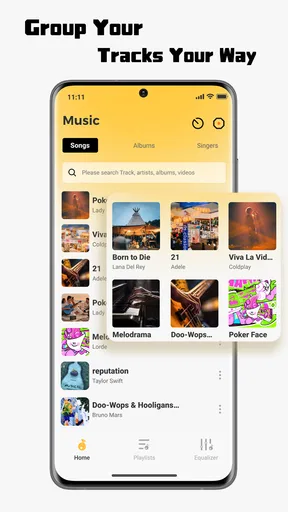
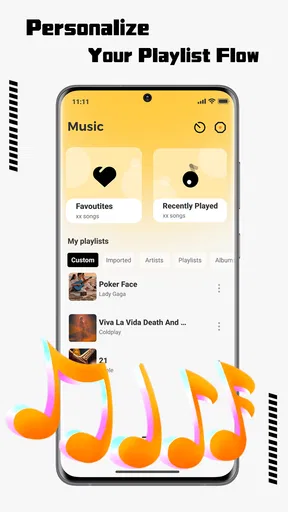
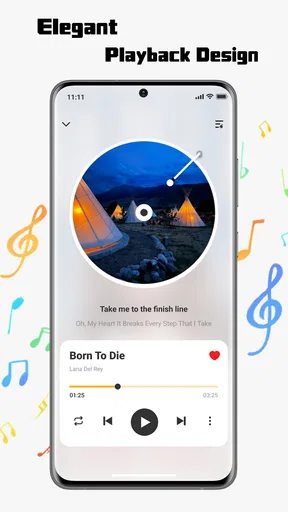
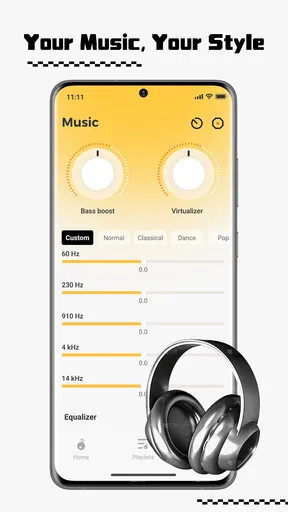
 Analysis by AppCompare
I approached SonicNest as a practical listening app rather than judging it by its inviting “music universe” idea alone. It is a free Music & Audio app from YIXIANG, aimed at people who want a straightforward way to spend time with music on an Android device. After using it, my main conclusion is simple: it is worth trying if you want a low-cost listening companion and are comfortable exploring its approach, but it should not automatically replace a service you already rely on for a carefully organized library, familiar discovery tools, or a highly predictable playback routine.
The app is available to everyone, runs on Android 8.0 and later, and has reached over ten million installs. That level of adoption makes it easier to take seriously as something people actually use, while its average score of 4.1 from roughly twelve thousand ratings suggests a generally positive reception with enough mixed experience to justify a closer look. I would not treat it as flawless, and I would not choose it solely because it is popular. The better question is whether its style of music access matches the way you listen.
What I would check before making it my main music app
My first decision point is the role I want the app to play. A music player can be a daily library tool, a background companion, a discovery surface, or simply something to open when I want sound without spending time configuring a complicated system. SonicNest makes the most sense in the latter two roles. Its presentation encourages a relaxed relationship with listening, so I found myself evaluating it by how quickly it helped me settle into music rather than by whether it could replace every feature of a full music ecosystem.
The second point is how much control I need. Some listeners want exact album organization, detailed queue editing, extensive sorting, and a familiar path from artist to release to track. Others mainly want to start listening, move through music naturally, and avoid paying before they know whether an app suits them. If you belong to the first group, you should be more demanding during your first session. If you belong to the second, the free entry point makes experimentation painless.
I also pay attention to the cost of changing habits. Moving from an established player is not just a matter of installing another app. My playlists, saved tracks, listening routines, and expectations all come with me. SonicNest is easier to judge as an additional option first. I would keep my usual player available, spend several listening sessions with this one, and only then decide whether it deserves a central place on my phone.
That trial approach is especially sensible because the developer is YIXIANG and the current release is version 1.5.4. A current version number tells me the app is being presented as an actively maintained product, but it does not guarantee that every device will behave identically. Android phones differ in storage, audio settings, background behavior, and manufacturer-specific battery controls. I would therefore judge the experience on the phone I actually use, not on assumptions based on another device.
The first-session test I recommend
My preferred test is short but deliberate. I would open the app when I have enough time to listen without rushing, try the main path that leads to music, and notice whether the interface feels understandable without repeated backtracking. Then I would use it in three different situations: a brief break, a longer uninterrupted session, and background listening while doing a simple household task. Those situations reveal more than a quick glance at the welcome screen.
Worth Reading Before You Choose

EA SPORTS FC Mobile 26 Is a Bigger Football Game, but It Takes Time

Flipboard Shows What News Apps Must Do Beyond the Feed

Switching to Android Auto Means Rethinking Your Driving Routine

Google Calendar Makes a Crowded Week Easier to Manage

Ludo King Makes the Most of the Minutes Between Plans

Baby Panda World Brings Quick Play to Modern Phones, but Its Game Library Feels Busy
I would also test how easily I can recover from interruption. Pause the music, leave the app, return later, and see whether the listening flow still feels natural. Switch between tracks or listening areas if the interface offers that path. The important insight is that a music app can feel attractive for its first few minutes yet become tiring when every small change requires extra taps. SonicNest deserves to be judged on the repeated actions I would perform every day, not only on its visual first impression.
One useful habit is to decide in advance what success means. For me, success would be opening the app and reaching suitable music without friction, understanding where I am, and feeling that the listening experience adds something instead of creating another library-management chore. For you, success might mean a calmer way to explore music or a simple alternative to a subscription-based service. Defining that goal prevents the app from being judged against a standard it was never meant to meet.
Where SonicNest earns its place
The strongest part of the experience is its approachable identity. SonicNest does not present itself like a dry file browser or a technical audio utility. It frames listening as a journey, and that makes it more inviting for someone who wants to press play rather than spend a long time arranging settings. I found that tone useful when I was undecided about what to hear. Instead of treating every session as a search task, I could approach it as a small break in the day.
That quality matters in ordinary situations. Imagine finishing work, putting your phone on a table, and wanting music while preparing dinner. You may not want to build a queue, compare several services, or manage a large collection. A lighter music app can be valuable there because the goal is not perfect curation; it is creating a pleasant transition between tasks. SonicNest fits that moment better than an app that makes every choice feel like library administration.
I also like the fact that it is free to try. There is no financial barrier forcing me to decide before I understand the experience. That helps in households where one person wants something simple and another already has a preferred service. SonicNest can be tested as a second listening option without immediately becoming a commitment. For a free app with an Everyone rating, it is also an easy candidate to consider for mixed-age use, although I would still supervise how any family member uses a music service and what they choose to listen to.
A less obvious strength is its potential as a reset button. When I use the same familiar player every day, I can become locked into the same albums, playlists, and habits. Opening a differently organized app can encourage me to listen with less routine. That does not mean it will automatically provide better discovery, and I would not promise that outcome to every user. The benefit is more personal: SonicNest can make listening feel like an activity again instead of a background process I start without thinking.
Another practical tip is to use it for a defined purpose rather than asking it to do everything immediately. I would give it a week as a “casual listening” app, keeping my established player for carefully planned sessions. During that week, I would note which moments feel easier in SonicNest and which make me reach for the alternative. This side-by-side test reveals its real value quickly. If it makes spontaneous listening more enjoyable, it has earned a role even if it does not become my only music app.
Small habits that make the trial more useful
I would avoid judging the app during a noisy commute or a rushed morning. In those conditions, any unfamiliar interface can feel worse than it is because my attention is divided. Instead, I would explore it at home, with headphones or a speaker I already know, and focus on the path from opening the app to sustained listening. This separates SonicNest’s design from problems caused by poor listening conditions.
I would also pay attention to whether I can remember the route to my preferred music after a few sessions. Memorability is an underrated feature. An interface does not need to show every option at once, but it should help me build a reliable mental map. If I still feel lost after repeated use, that is a meaningful weakness for a daily player, even if the overall design looks pleasant.
Finally, I would resist filling the app with expectations borrowed from premium services. A free app can be useful without matching every advanced tool found elsewhere. The fair test is whether its own listening flow is enjoyable and dependable. That distinction helped me appreciate SonicNest’s accessible side while remaining realistic about the possibility that a specialist player may be better for more demanding music management.
Where another type of music app may fit better
SonicNest is not the obvious choice for everyone. If your music life is built around a large personal collection, you may prefer a traditional local music player that gives you direct control over folders, tags, albums, and playback order. In that situation, the central question is not how inviting the app feels; it is whether it handles your existing files exactly as you expect. A more technical player may be less charming but more suitable for careful organization.
The same applies to listeners who depend on a mature streaming ecosystem. If you already have years of playlists, saved releases, recommendations, and social habits in one place, switching can feel like starting over. SonicNest may still be interesting as a supplementary app, but it is unlikely to remove the practical value of everything you have already built elsewhere. I would not abandon a familiar service just because a new interface feels fresh during its first session.
People who need highly specific control should also compare carefully. Audiophiles, DJs, commuters with strict offline routines, and users who organize music around detailed metadata often need tools that are designed around those exact workflows. A general music app can be enjoyable and still be the wrong instrument for precise work. In my view, SonicNest is better positioned for relaxed listening than for a demanding catalog-management job.
There is also a difference between wanting discovery and wanting certainty. If I know the exact artist, album, or track I want, a search-centered service may get me there faster. If I want to browse and let the mood lead, SonicNest’s more atmospheric positioning may feel more natural. Neither approach is universally superior. The trade-off is control versus openness: the more I specify in advance, the less I need the app to guide the experience.
Families should make a similarly practical comparison. The Everyone rating makes the app broadly approachable, but age suitability is not the same as a complete family-management solution. Parents should consider the listening habits they want to encourage and whether the app’s navigation gives them enough confidence for unsupervised use. For a shared device, I would test it with the least technical family member first. If that person can find music comfortably, the app becomes a stronger household candidate.
The friction of changing from a familiar player
The biggest switching cost is not installation; it is repetition. I already know where my usual app places search, saved music, queues, and settings. With SonicNest, I need to learn its logic, and that learning takes attention. Even a pleasant interface can become frustrating if I have to stop listening to remember where a common action lives. This is why I recommend a gradual switch rather than deleting the old app immediately.
My practical method is to keep both apps available and assign them different jobs. I would use SonicNest for open-ended sessions and mood-based listening, while reserving the established player for planned albums or a carefully maintained collection. After several days, the decision becomes clearer: either SonicNest starts to feel like the easier choice in its role, or I discover that the alternative handles my habits more efficiently.
Another trade-off is mental clutter. Adding a second music app can create two places to remember, two interfaces to maintain, and possibly two different listening routines. If you already feel overwhelmed by apps, SonicNest may not be worth keeping simply because it is free. Free storage space is not the same as free attention. I would retain it only if it solves a real listening problem or gives me a noticeably better way to relax with music.
There is also a useful distinction between trying and migrating. Trying SonicNest costs very little because the app is free, but migrating your entire music life is a separate decision. I would not make that move until I had confirmed that the app suits my most common sessions, that I can navigate it without hesitation, and that I am happy with the compromises involved. This approach protects the routines that already work while leaving room for something new.
My recommendation after weighing the alternatives
I recommend SonicNest to Android users who want a free, approachable Music & Audio app and enjoy treating listening as a relaxed experience rather than a technical project. It is particularly appealing as a secondary player, a casual discovery companion, or an app for those moments when I want to move into music without overplanning the session. Its broad availability, Everyone rating, and substantial install base make it a reasonable app to test rather than an obscure gamble.
I would be more cautious if you need a definitive home for a carefully organized collection. In that case, compare its everyday workflow with your current player before changing anything. Users who depend on advanced library control, established playlists, or a very specific offline routine may be happier with an alternative built around those priorities. SonicNest can still have value, but it may be a companion instead of a replacement.
The best way to decide is to give it a focused trial: use it during a short break, a longer listening session, and one ordinary task such as cooking or tidying. Notice how quickly you reach music, how easy it is to return after an interruption, and whether you remember the navigation without thinking. Those three checks tell me more than the store summary ever could.
YIXIANG has made a free app that is easy to approach and interesting enough to deserve a fair test. I like its emphasis on making music feel inviting, but I would keep my expectations grounded and compare it with the habits I already have. My clear advice is to install it when you want a low-pressure listening alternative, not when you need guaranteed control over every part of a serious music library. For the right listener, that distinction is exactly where SonicNest becomes useful.
Pros
- Clean
- distraction-free interface for browsing and playing music.
- Responsive playback controls make pausing and skipping quick.
- Useful library organization for keeping tracks easy to find.
- Supports convenient listening without relying on video-focused services.
- Lightweight design feels suitable for everyday music playback.
Cons
- Feature availability may vary between Android and iOS versions.
- Limited information is available about long-term update support.
- Users may miss advanced equalizer and audio customization tools.
- No clear advantage over established players with larger ecosystems.
- Music discovery options may feel basic for listeners seeking recommendations.
FAQs for SonicNest — Music Player
What is SonicNest — Music Player, and what does it offer?
SonicNest — Music Player is designed for users who want to listen to music stored on their device through a focused, easy-to-use player. Its main purpose is local music playback rather than replacing a full streaming service. Depending on the version and device, you may find features such as library browsing, playlists, playback controls, album and artist organization, repeat and shuffle modes, and background listening.
Can SonicNest play music without an internet connection?
Yes, SonicNest is primarily useful for playing audio files that are already available on your Android or iOS device, so an internet connection is generally not required during playback. However, the app does not automatically provide access to songs you have not downloaded or legally transferred to your phone. Offline performance can also depend on supported file formats, storage permissions, and how your device manages background apps.
Which audio files and music sources are supported by SonicNest?
SonicNest is intended for personal music libraries, but the exact file formats and sources it recognizes may vary by platform and app version. Music saved locally on the device is usually the most reliable option, while files inside protected streaming services may not be accessible. Before downloading, check the current store description and permissions to confirm compatibility with your preferred formats and storage locations.
Does SonicNest include streaming, music downloads, or access to copyrighted songs?
SonicNest should not automatically be considered a music streaming catalog or a source of free copyrighted downloads. Its core function is normally playback and organization of music that you already own or have obtained legally. If the app includes online features, availability may differ by region and version. Users should review the developer’s terms and respect copyright rules when importing or sharing audio.
Is SonicNest free to use, and are there advertisements or in-app purchases?
The cost of SonicNest can depend on the version available in the Android or iOS store. Some releases may be free with advertising, while others can include premium upgrades, optional purchases, or limitations on certain features. We recommend checking the current listing before installing because pricing, subscriptions, advertisements, and supported devices can change. Also review the privacy policy and requested permissions before granting access.


